
AI Flyer Prompts: Master Design Prompts That Convert
In the world of AI design, your words are your paintbrush. A simple idea can become a powerful marketing tool, but only if you communicate it effectively. Have you ever wondered why your AI-generated flyers don't quite hit the mark? The secret often lies not in the tool itself, but in the quality of your prompt. A precise, well-crafted instruction can transform a basic concept into a stunning flyer design that captures attention and drives action.
This guide will teach you how to move beyond simple requests and start writing AI flyer prompts like a professional. We'll break down the essential components, explore industry-specific formulas, and reveal advanced techniques to get the results you need. With the right prompts, you can unlock the full potential of AI design and create materials that truly convert. Ready to elevate your designs? You can put these tips into practice immediately with our AI flyer generator.

The Anatomy of High-Converting AI Flyer Prompts
Crafting a high-converting prompt is both an art and a science. It's about giving the AI a clear blueprint to follow. Vague instructions lead to generic results, but a detailed prompt acts as a creative director, guiding the AI toward a specific, effective outcome. Think of it as providing a complete brief for a human designer.
A great prompt doesn't just describe what you want; it explains the who, what, why, and how of your flyer. It defines the target audience, the core message, the desired mood, and the visual style. Master this structure, and you'll gain control over the creative process. This ensures your final design aligns perfectly with your marketing goals.
Essential Elements Every Flyer Prompt Must Include
To get professional results, your prompts need structure. A comprehensive prompt provides the AI with all the necessary context to generate a relevant and visually appealing flyer. Skipping any of these elements can lead to a design that misses the mark. Here are the core components your AI flyer prompts should always contain:
- Core Subject & Purpose: What is the flyer for? Be specific. Instead of "flyer for a sale," try "flyer for a 50% off summer clearance sale on all clothing."
- Key Text & Information: Include the exact text you want on the flyer. This includes the main headline, date, time, location, website, and any call to action like "Register Now" or "Visit Us Today."
- Target Audience: Who are you trying to reach? A flyer for tech startup investors should look very different from one for a children's party. Mentioning the audience (e.g., "for young professionals," "for families with kids") helps the AI choose appropriate imagery and tone.
- Visual Style & Mood: This is where you set the creative direction. Use descriptive words. Do you want it to be "minimalist and clean," "vibrant and energetic," "professional and corporate," or "playful and fun"?
- Color Palette: Specify the main colors. You can be general ("use a blue and white color scheme") or specific ("dominant color is deep navy blue with accents of gold and white").
Common Prompt Mistakes That Ruin Your Flyer Design
Even with the best intentions, small mistakes in your prompt can lead to disappointing results. Understanding these common pitfalls is the first step toward avoiding them. Are you making any of these errors?
- Being Too Vague: Prompts like "make a business flyer" are too broad. The AI has no context. A better prompt would be: "Create a professional business flyer for a new coffee shop called 'The Daily Grind,' featuring a modern, minimalist style."
- Forgetting Essential Details: Leaving out the date, address, or contact information means the AI can't include it. Always double-check that you've provided all the necessary text content within your prompt.
- Using Contradictory Terms: Avoid asking for something that is both "minimalist and cluttered" or "calm and chaotic." Conflicting instructions will confuse the AI and produce messy, unfocused designs.
- Not Specifying a Format: While many tools have settings for this, including your desired orientation (e.g., "vertical A4 flyer") in the prompt can help reinforce your intended layout.
- Giving Up After One Try: Your first prompt is rarely your last. Think of it as a conversation. Use the first output as a starting point and refine your prompt to get closer to your vision. Ready to experiment? Create a flyer and see how small changes can make a big difference.
Industry-Specific Prompt Formulas for Maximum Impact
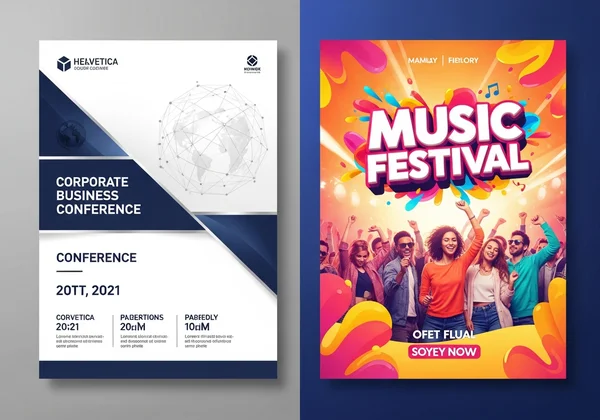
Different industries require different visual languages. A flyer for a corporate conference needs to convey professionalism, while a concert flyer must scream excitement. Tailoring your prompts to your specific industry is key to creating materials that resonate with your target audience. Below, we provide battle-tested prompt formulas for two common use cases. Simply fill in the blanks with your own details to quickly generate a flyer that feels custom-made for your needs.
Business Prompts That Generate Professional Corporate Flyers
For small business owners and marketing managers, flyers are a crucial tool for promotions and building brand awareness. The goal is to look polished, trustworthy, and professional. This formula is designed to produce clean, corporate-style flyers perfect for B2B marketing, service announcements, or store promotions.
The Formula:
Create a [Style Adjective] business flyer for a [Your Business Type] named "[Your Business Name]". The headline should be "[Your Headline]". Include the following text: [List of key services or benefits]. The visual style should be [Describe Style - e.g., corporate, clean, modern] with a [Color Palette] color scheme. The tone should be [Describe Tone - e.g., professional, trustworthy, innovative].
Example in Action:
"Create a professional business flyer for a financial consulting firm named 'Clarity Capital'. The headline should be 'Secure Your Financial Future'. Include the following text: 'Services: Retirement Planning, Investment Management, Wealth Strategy'. The visual style should be corporate and modern with a navy blue and silver color scheme. The tone should be trustworthy and expert."
Event Prompts That Create Eye-Catching Flyers That Drive Attendance
Event planners live in a fast-paced world where grabbing attention is everything. Whether it's a music festival, a community fundraiser, or a grand opening, your flyer needs to stand out and create a sense of excitement. This formula focuses on generating dynamic, eye-catching designs that make people want to be there.
The Formula:
Design an [Mood Adjective] event flyer for "[Event Name]". The event is a [Type of Event] on [Date] at [Location]. The style should be [Describe Style - e.g., energetic, festive, elegant] with a [Color Palette] color palette. The headline is "[Event Headline]". Feature key information: [List special guests, activities, or ticket price]. The call to action is "[Your CTA]".
Example in Action:
"Design an energetic event flyer for 'Summer Fest 2024'. The event is a music festival on July 20th at Central Park. The style should be vibrant and retro with a warm color palette of orange, yellow, and pink. The headline is 'Feel the Vibe!'. Feature key information: 'Live Bands, Food Trucks, All Ages Welcome'. The call to action is 'Get Your Tickets Now!'."
You can test these powerful formulas right now. Head over to the online flyer maker and bring your next promotion to life.
Advanced Prompt Techniques Used by Marketing Professionals
Once you've mastered the basics, you can start using advanced prompting techniques to refine your designs and optimize them for specific marketing outcomes. These methods are used by seasoned marketers to push the boundaries of what AI can do, allowing for greater control and more sophisticated results. These techniques involve thinking more strategically about your inputs. Instead of just describing a final product, you're guiding the AI through a more nuanced creative process.
A/B Testing Your Prompts for Optimal Results
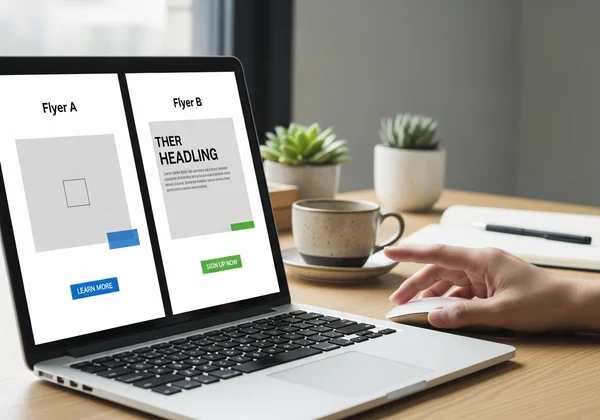
In marketing, assumptions are dangerous—that's why testing is essential. A/B testing isn't limited to websites and emails. You can apply the same principle to your AI flyer prompts to see what works best. By creating two slightly different versions, you can generate two design variations and see which performs better. This data-driven approach helps you move beyond guesswork.
Here’s how to do it:
- Create a Control Prompt: Write a solid, detailed prompt using the formulas we've discussed. Generate your "Flyer A."
- Isolate One Variable: Copy the control prompt and change only one element. For example, change the call to action from "Learn More" to "Get 20% Off Today," or change the style from "modern" to "classic."
- Generate Your Variation: Use the new prompt to generate "Flyer B."
- Compare and Analyze: Which flyer is more compelling? Which headline grabs more attention? If you can, test both versions with a small segment of your audience to see which gets a better response.
Layering Multiple Concepts in Single Prompts
Power users create incredibly rich designs by layering multiple ideas within a single, complex prompt. This involves using more descriptive language and combining stylistic elements to create a unique hybrid look. It requires more thought but can yield truly original results. The key is to use connecting phrases to blend concepts smoothly. Instead of just listing adjectives, you explain how they relate.
- Vague Prompt: "A flyer for a tech conference, futuristic and minimalist."
- Layered Prompt: "Create a flyer for the 'Innovate 2025' tech conference. The design should have a futuristic aesthetic, inspired by circuit boards and data streams, but executed with a clean, minimalist layout. Use a dark background with electric blue and white glowing accents to create a high-tech yet sophisticated feel."
This layered approach gives the AI much more creative direction, resulting in a design that is both detailed and coherent. Feel inspired? Design your own flyer with these advanced techniques.
Start Prompting Like a Pro: Elevate Your Flyer Design Today
Mastering the art of the AI prompt is the single most effective way to transform your flyer design process. You no longer need to settle for generic templates or wrestle with complex software. By providing clear, detailed, and strategic instructions, you can guide AI to produce professional, high-converting flyers in seconds.
By now, you've discovered the secrets to crafting AI prompts that transform simple ideas into stunning flyers. These techniques aren't just theory—they're practical tools you can use right away to elevate your marketing materials. Just remember to:
- Be Specific: Provide clear details about your subject, text, audience, and style.
- Be Structured: Use a consistent formula so you don’t miss crucial information.
- Be Iterative: Don't be afraid to experiment and refine your prompts.
The power to create stunning promotional materials is now at your fingertips. Take what you've learned and put it into action. Elevate your marketing, captivate your audience, and watch your ideas come to life.
Ready to create your first masterpiece? Try FlyerDesign.io for free and start prompting like a pro today!

The Takeaway
How long should my AI flyer design prompt be?
There's no magic length. A good prompt is typically between 25 and 75 words. Focus on clarity and detail, not length. Include these essential elements: subject, text, audience, style, and color. Don't worry about hitting a specific word count. A concise but detailed prompt is always better than a long, rambling one.
Can I use emotional language in my prompts?
Absolutely! Using emotional or evocative language is a great way to guide the mood of the design. Words like "joyful," "powerful," "serene," or "nostalgic" give the AI strong clues about the feeling you want to convey. This helps ensure the final design connects with your audience on an emotional level.
What's the best way to describe colors in my prompts?
Be as specific as you can. Instead of "blue," try "royal blue," "sky blue," or "navy blue." You can also describe color relationships, like "a palette of earthy tones like forest green and burnt sienna" or "a high-contrast black and white design with a single red accent." The more detail you provide, the closer the AI's output will be to your vision.
How do I ensure my AI-generated flyer matches my brand?
To ensure brand consistency, include your brand's core elements in the prompt. Specify your brand's colors and describe its personality (e.g., "playful and fun," "luxurious and elegant," "minimalist and modern"). For example: "Create a flyer with a playful and fun style using our brand colors of bright yellow and magenta." While you can't upload a logo yet, this is a great way to align the design with your brand identity.
Can I combine multiple flyer ideas in one prompt?
Yes, this is an advanced technique we call layering. You can combine different styles by using clear connecting language. For example: "Create a flyer with a vintage, 1950s diner aesthetic, but with a modern, clean typography." This tells the AI how to merge the two ideas. Experimentation is key to finding what works best for your unique concept. You can experiment on our AI flyer tool.