
Mastering AI Flyer Design Prompts for Perfect Results
Unlocking the full potential of AI for your marketing materials isn't just about the tool—it's about the communication. Mastering the art of crafting the perfect prompt is the key to transforming your vision into a stunning, professional flyer. This guide will show you exactly how to master ai flyer design prompts to get the results you need, every time.
The secret to generating incredible visuals is understanding that an AI is a powerful, literal-minded assistant. It doesn't guess your intentions; it follows your instructions. With an advanced online flyer design maker, you can turn a few lines of text into a high-impact promotional tool in seconds. Let’s dive into how you can become a prompt master.
Why Your AI Flyer Prompts Are Key to Design Success
Think of your prompt as the blueprint for your design. A vague or incomplete blueprint will lead to a confusing or generic outcome. However, a detailed, clear blueprint allows the AI to construct exactly what you envisioned. This is the fundamental principle behind getting great results from any AI-powered creative tool, especially when you want to create a flyer design that captures attention and drives action.
Understanding AI's Interpretation of Your Words
At its core, an AI flyer generator processes natural language by identifying keywords, concepts, and the relationships between them. When you type "modern business flyer for a coffee shop grand opening," the AI breaks it down. It recognizes "modern" as a style, "business flyer" as the format, and "coffee shop grand opening" as the subject. The more specific details you provide, like "warm tones, minimalist layout, and an image of a steaming latte," the more accurately the AI can build a relevant and compelling visual. This is the essence of professional flyer design.
Bridging the Gap Between Vision and AI Generation
The biggest challenge users face is translating the picture in their head into text the AI can understand. You might envision a flyer that feels "exciting," but "exciting" can mean different things. Does it mean vibrant colors, dynamic shapes, or bold typography? To bridge this gap, you must become a translator. Instead of just "exciting," try "a party flyer with neon pink and electric blue colors, abstract geometric shapes, and a futuristic font." Suddenly, your abstract feeling becomes a concrete set of instructions, giving the AI a clear path to generating your ideal event flyer design.
The Anatomy of a High-Converting AI Flyer Prompt
A powerful prompt is more than just a random collection of words; it’s a structured request containing several key components. Mastering this structure is one of the most effective ai design tips you can learn. Each element guides the AI, ensuring the final output isn't just beautiful but also effective for your marketing goals.
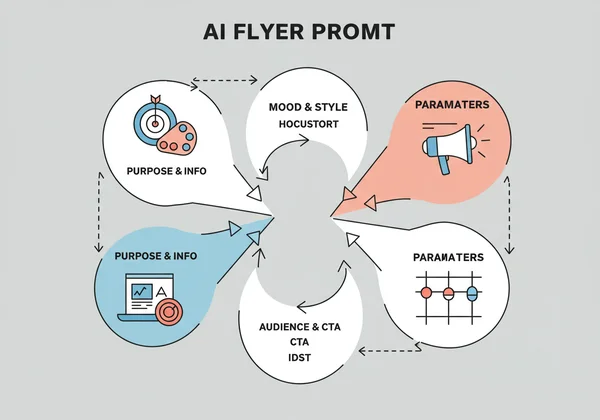
Clearly Define Your Purpose and Key Information
This is the non-negotiable foundation of your prompt. The AI needs to know what the flyer is for and what essential information it must include.
- What is it?: A grand opening, a flash sale, a community bake-off, a webinar.
- Who is it for?: Your business name, event title.
- When and Where?: Date, time, address, URL.
- The Offer: 20% off, free entry, special guest.
Example: "Flyer for 'Dave's Tech Repair' grand opening. Event on October 26th at 123 Main St. Offering 50% off all services on opening day."
Guide the AI with Desired Mood, Style, and Visual Cues
Now, bring your vision to life by describing the aesthetics. This is where you can get creative and ensure the flyer matches your brand's personality. Think about adjectives that describe the feeling you want to evoke. This is crucial for creative flyer design.
- Mood: Professional, fun, elegant, energetic, calm, serious.
- Style: Minimalist, corporate, retro, modern, futuristic, rustic, playful.
- Visuals: Use of a specific image (e.g., "a golden retriever wearing a party hat"), color palette ("earthy tones of brown and green"), or graphic elements ("clean lines and simple icons").
Pinpoint Your Target Audience and Call to Action (CTA)
A flyer's success is measured by the action it inspires. Tell the AI who you're talking to and what you want them to do. This ensures the design resonates with the right people and has a clear purpose.
- Audience: "Targeting young professionals," "for families with children," "aimed at university students."
- Call to Action: "Visit our website," "Scan QR code to RSVP," "Call now to book," "Don't Miss Out!" The AI can often integrate the CTA into the design in a prominent way.
Leveraging the AI flyer generator's parameters (Colors & Sizes)
A great tool like the flyer maker on our site enhances your prompt with structured inputs. After writing your detailed prompt, you can select specific parameters like primary colors and standard sizes (A4, A5, US Letter). This combination of free-form text and guided selection gives you the ultimate control, ensuring the final product is both creatively aligned and technically ready for print or digital sharing.
From Vague to Vibrant: Prompt Examples That Get Results
Let's put theory into practice. Seeing the difference between a weak and an effective prompt is the best way to understand how to craft your own flyer design prompt ideas. These examples will show you how to provide the clarity the AI needs.
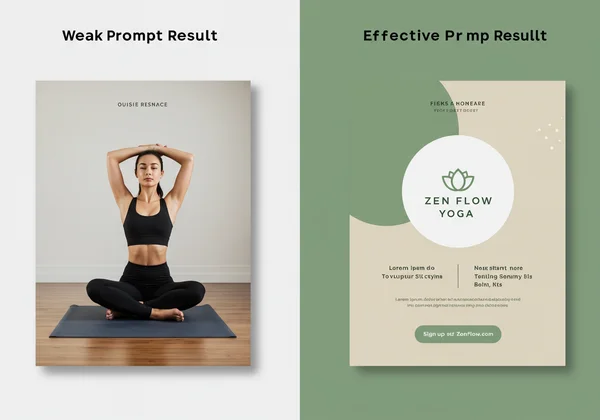
Weak Prompt vs. Effective Prompt: A Comparison
Imagine you need a flyer for a new yoga studio.
-
Weak Prompt: "Yoga class flyer."
- Result: The AI will likely produce something generic, possibly with a stock photo of a person in a yoga pose. It will lack personality, specific details, and a clear call to action. It’s a flyer, but it won’t convert.
-
Effective Prompt: "Calm and welcoming flyer for 'Zen Flow Yoga' studio's grand opening. Style is minimalist with a natural, earthy color palette of sage green and beige. Feature a simple lotus flower icon. Include the text: 'Grand Opening - October 15th. First class free!' with a clear call to action: 'Sign Up at ZenFlow.com'. For an audience of busy professionals seeking relaxation."
- Result: This prompt gives the AI everything it needs. The mood ("calm and welcoming"), style ("minimalist"), colors, icon, essential text, and audience are all defined. The output will be a targeted, on-brand, and professional flyer ready to attract clients. This is how you design your own flyer with precision.
Real-World Scenarios: Business, Event, and Party Flyer Prompts
- Business Flyer Design Prompt: "Professional and modern business flyer for a digital marketing agency called 'GrowthLeap'. Use a corporate blue and grey color scheme. Style should be clean with geometric shapes. Highlight our core services: SEO, Social Media, and Content Creation. Include our logo concept: an upward-pointing arrow. The main headline is 'Elevate Your Brand'. Add a CTA: 'Schedule a Free Consultation Today'."
- Event Flyer Design Prompt: "Energetic and exciting music festival flyer for 'Summer Sound Fest'. Featuring a vibrant sunset color gradient of orange, pink, and purple. Include silhouettes of a crowd dancing. Use a bold, retro font for the title. List the headliners: The Echoes, Solar Flare, DJ Nova. Date: July 22-23. CTA: 'Buy Tickets Now!'"
- Party Flyer Design Prompt: "Fun and playful flyer for a child's 5th birthday party. Theme is 'Jungle Adventure'. Use bright greens and yellows. Feature cartoon illustrations of a friendly lion, monkey, and toucan. The text should read: 'You're Invited to Leo's 5th Birthday Bash!'. Include date, time, and address. Make it look cheerful and inviting for kids and parents."
With these examples, you can see how specificity turns the AI into your personal graphic designer. You can easily adapt these structures for any need, from a real estate flyer to a food festival announcement. Try our ai flyer generator to see for yourself.
Pro Tips for Optimizing Your AI-Generated Flyer Designs
You've learned the anatomy of a great prompt. Now, let's cover a few pro tips to refine your process and ensure you get truly exceptional results every time you create flyer design work.
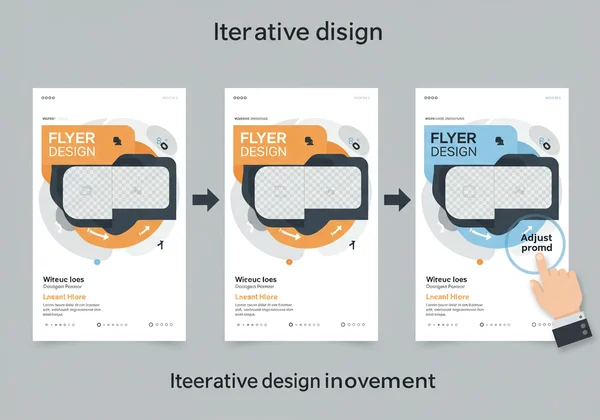
Iteration is Key: Refine and Regenerate
Your first generation might be close, but not perfect. Don't be discouraged! This is a normal part of the creative process. Look at the output and identify what you'd like to change. Maybe the font is too formal, or the color is slightly off. Tweak your prompt with more specific instructions—for example, change "bold font" to "playful bubble font"—and click "Generate" again. Each iteration gets you closer to your perfect design.
The Power of Specificity: Less Ambiguity, Better Output
Ambiguity is the enemy of good AI design. The more precise you are, the better the result. Instead of saying "use a picture of a dog," specify "use a high-quality photo of a happy golden retriever catching a frisbee." Instead of "bright colors," try "a color palette of lemon yellow, turquoise, and magenta." Specificity removes the guesswork for the AI and puts you firmly in the driver's seat of the design process, leading to outstanding minimal flyer design or any other style you can imagine.
Master Your Prompts, Master Your Flyer Design
You now hold the keys to unlocking the incredible power of AI for graphic design. Crafting a detailed, specific, and well-structured prompt is not just a suggestion; it is the single most important step in transforming your vision into a professional, effective flyer. By defining your purpose, describing the aesthetics, and clarifying your audience and CTA, you empower the AI to work for you with stunning precision.
Forget spending hours with complicated software or blowing your budget on designers for every small promotion. The future of design is here, and it’s accessible to everyone. Take what you’ve learned today and put it into action. Go ahead and start designing now.
Frequently Asked Questions About AI Flyer Prompts
How can I design my own flyer effectively with AI?
Effectively designing your own flyer with AI starts with a high-quality prompt. Clearly state the flyer's purpose, all essential text (event name, date, offer), the desired style (e.g., modern, minimalist), mood (e.g., professional, fun), and color preferences. The more detail you provide, the closer the AI-generated result will be to your vision. Our flyer design tool makes this process simple and intuitive.
What makes a good prompt for AI flyer generation?
A good prompt is specific, structured, and comprehensive. It should include the core content, stylistic guidance (mood, colors, fonts), a target audience, and a clear call to action. Think of it as a creative brief for the AI. A great prompt like, "An elegant food flyer for a new Italian restaurant using a rustic theme with red, white, and green colors," is far more effective than a vague one like, "restaurant flyer."
Can I create professional flyers without design skills using AI?
Absolutely. This is the primary advantage of an ai flyer generator. The AI is trained on effective design principles, so it handles the layout, typography, and color theory for you. Your role is to provide the creative direction through a detailed prompt. This empowers small business owners, marketers, and event planners to produce professional-grade materials without any formal design training.
How does an AI flyer generator save me time and cost?
An AI flyer generator dramatically cuts down the design process from hours or days to mere seconds. There's no need to learn complex software or go through lengthy back-and-forth revisions with a designer. This instant generation saves significant time. Financially, it eliminates the high cost of hiring a graphic designer, making professional marketing accessible for any budget. You can try our tool for free to experience the savings.